. INSTRUCTIONS
> FOR MIXING
. 1_ Consolidate each project :
A folder per audio project(Song, music, audio report/documentary, etc...)
The folder’s name must bear the name of the client (or artist)
then the name of the project,
Exemple : Mozart_Sonate n°16
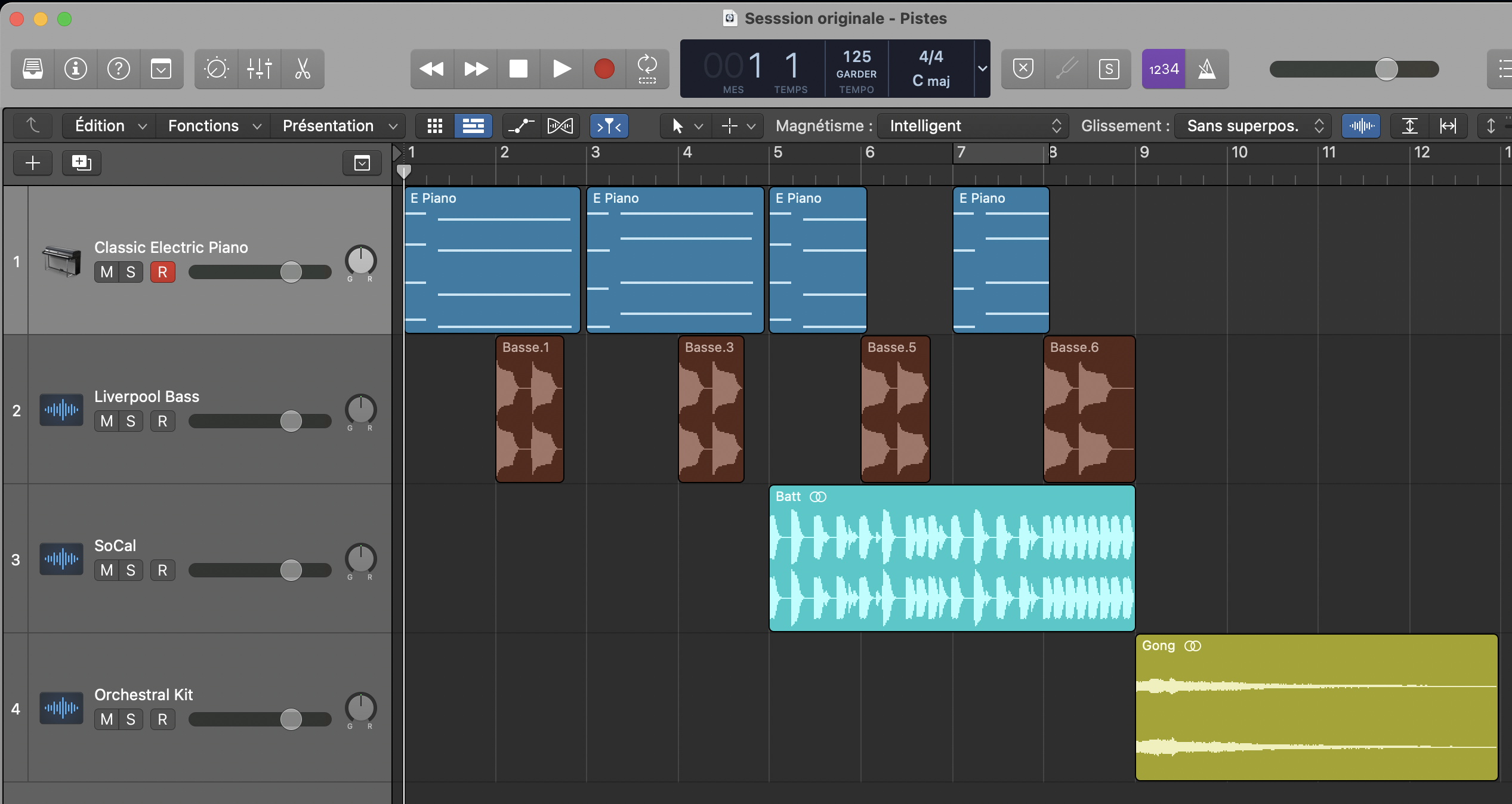
Name each of the tracks,
before exporting them in the project's folder.
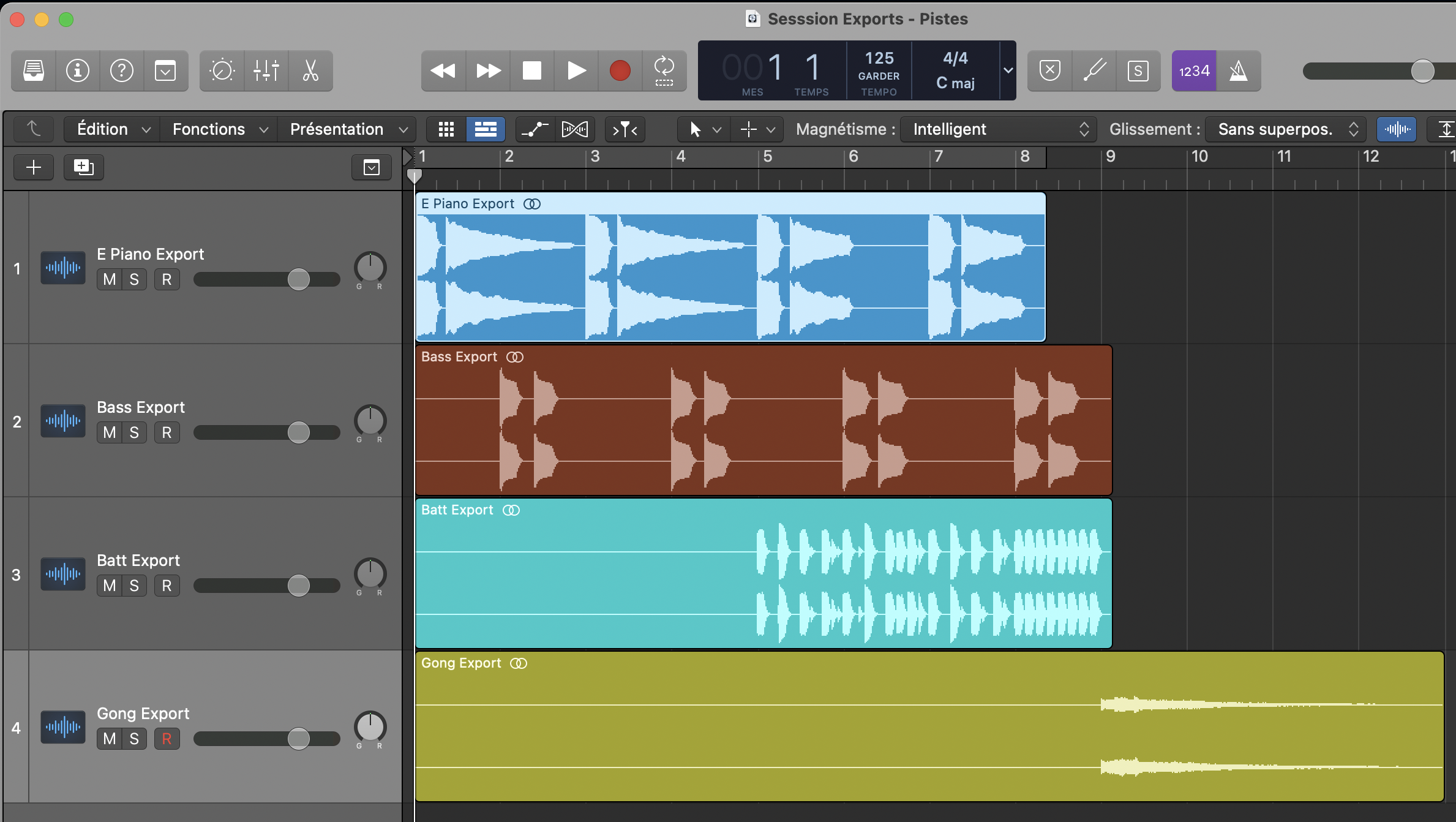
Export each of the tracks,
Minimum format desirable .wav or .aiff 24 bits /48000khz
Without processing, no dynamics (no compressor or limiter), no equalization, without reverberation, nor at a volume above 0dB, nor volume normalization.
For the tracks for which you want to keep your audio processing,
Send an export of the track with this audio processing and an export without the audio processing.
The file of each exported track must start from the first beat of the project.
Reference version:
In addition to sending the version without processing on the master bus,
You can send a stereo export of your working version of the project with the master bus processing activated that you may have put.
You can also send as a template a recording of a production of a character close to that of your project.
Indications :
If you have indications on the desired result, write them to us.
Project’s tempo: I
For musical projects, give the tempo information on a text file or with a MIDI file.
. 2_ Send files:
Put each project folder in a .zip file(Or other digital data transfer/archiving format)
Use www.wetransfer.com or Dropbox, or another service, to send the files.
>
. INSTRUCTIONS
> FOR MIXING + MASTERING
. 1_ Consolidate each project :
A folder per audio project(Song, music, audio report/documentary, etc...)
The folder’s name must bear the name of the client (or artist)
then the name of the project,
Exemple : Mozart_Sonate n°16
Name each of the tracks,
before exporting them in the project’s folder.
Export each of the tracks,
Minimum format desirable .wav or .aiff 24 bits /48000khz
Without processing, no dynamics (no compressor or limiter), no equalization, no reverberation, nor at a volume above 0dB, nor normalization of the volume.
For the tracks for which you want to keep your audio processing,
Send an export of the track with this audio processing (add TRT at the end of the file name) and send an export without the audio processing.
Each exported track must start from the first beat of the project,
Reference version:
In addition to sending the version without processing on the master bus,
You can send a stereo export of your working version of the project with the master bus processing activated that you may have put.
You can also send as a template a recording of a production of a character close to that of your project.
Project’s tempo:
For musical projects, give the tempo information on a text file or with a MIDI file.
Indications :
If you have indications on the desired result, write them to us.
. 2_ Send the files :
Put each project folder in a .zip file(Or other digital data transfer/archiving format)
Use www.wetransfer.com or Dropbox, or another service, to send the files.
>
. INSTRUCTIONS
> FOR MASTERING
1_ Export :
A folder per audio project (Song, music, audio report/documentary, etc...)The folder's name must bear the name of the client (or artist)
then the name of the project,
Exemple : Mozart_Sonate n°16
Export each stereo file to be mastered,
Minimum format desirable .wav or .aiff 24 bits /48000khz
If it is a mix,
Export it with the treatments on each track, but without processing on the master bus.
The level should be approximately -6dB maximum and maintaining variations in dynamics.
No Dither.
But if the file to be mastered is a recording (conference, or other) in compressed format (WMA, MP3, AAC...),
Send it as it is and we will convert it to work it.
Reference version :
In addition to sending the version without processing on the master bus,
You can send a stereo export of your working version of the project with the master bus processing activated that you may have put.
You can also send as a template a recording of a production of a character close to that of your project.
Name each file to be mastered, as for the project's folder.
Project’s tempo :
For musical projects, give the tempo information on a text file or with a MIDI file.
Indications :
If you have indications on the desired result, write them to us.
2_ Send the files :
Put each project folder in a .zip file(Or other digital data transfer/archiving format)
Use www.wetransfer.com or Dropbox, or another service, to send the files.
3_ After Receiving :
After Receiving and listening to files by AUDIO PRESENCE,You may be asked to make changes to your mix, then send these modified files to AUDIO PRESENCE in order to be able to proceed with the Mastering.
>
. INSTRUCTIONS
> FOR STEM-MASTERING
1_ Export each project :
A folder per audio project (Song, music, audio report/documentary, etc...)The folder’s name must bear the name of the client (or artist)
then the name of the project,
Example: Mozart_Sonate n°16
Name each group track, before exporting in the project’s folder.
Export each group of tracks of the project to be mastered,
Minimum format desirable .wav or .aiff 24 bits /48000khz
Export without processing, neither on groups nor on the master bus.
Set all groups to the same level so that when they are playing, the master bus is at about -6dB maximum and maintaining dynamic variations.
No Dither.
Reference version :
In addition to sending the version without processing on the master bus,
You can send a stereo export of your working version of the project with the master bus processing activated that you may have put.
You can also send as a template a recording of a production of a character close to that of your project.
Project’s tempo :
For musical projects, give the tempo information on a text file or with a MIDI file.
Indications :
If you have indications on the desired result, write them to us.
2_ Send the files :
Put each project folder in a .zip file (or other digital data transfer/archiving format).Use www.wetransfer.com to send the files.
3_ After Receiving :
After Receiving and listening to files by AUDIO PRESENCE,You may be asked to make changes to your mix, then send these modified files to AUDIO PRESENCE in order to be able to proceed with the Mastering.